
Principles, Scenarios and Suitability
Parking information separates vacant-space counting, plate reading and access authorisation, each with different errors. Plates can be linked to people but do not establish driver identity. Limit processing purposes and access permissions.
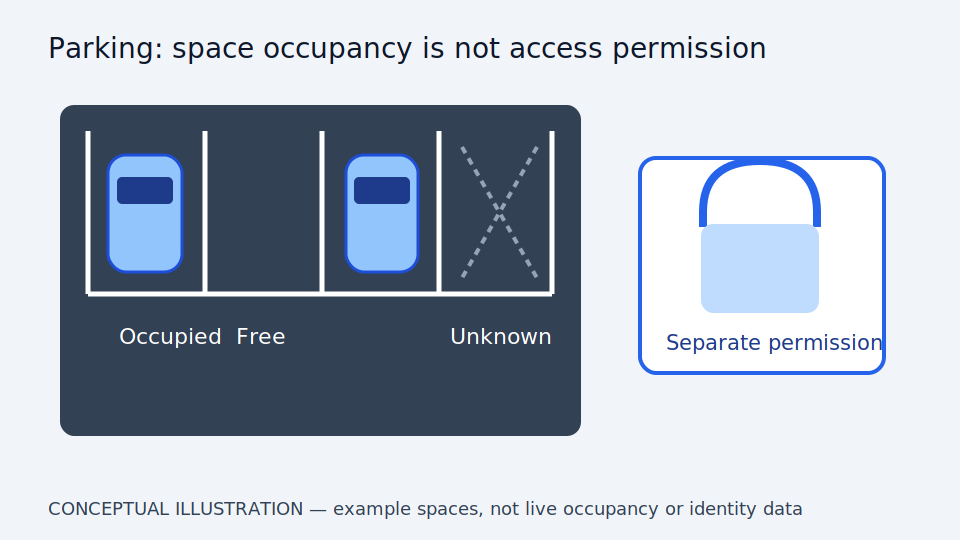
Separate three questions: which space might be empty, which vehicle passed, and whether it has permission. Entry/exit counts cannot locate spaces when vehicles straddle bays or park outside them. Plate reading cannot establish drivers. Unknown states matter under occlusion: falsely showing vacancies makes users search and disrupts traffic. Do not fill answers from unreconciled vehicle totals.
Engineering needs boundaries, space types and latest observation times. Combining images reduces occlusion but adds matching and personal data. Aggregate status may suffice for parking guidance without tracking every plate. Choose for the purpose, let staff correct conflicts and keep gate protection separate. Availability is not an opening command, and bay images are not evidence of clear traffic routes.
Scroll the diagram horizontally to inspect all details.
Illustrative Design Scenario
Illustrative design scenario: show possibly vacant spaces with uncertainty when another vehicle obstructs the view. Staff can correct status. Gate permission comes from authorisation lists, not merely a model estimate that parking space is available.
Suppose one vehicle straddles two bays and a motorcycle occupies a blind corner. Vehicle totals and actual space use differ. Display observed bay states and refer conflicts, rather than allocate vacancies from totals and suggest an occupied bay. Manual corrections need time and reasoning so they do not remain stale after movement.
Options include cameras at specific blind spots or aggregate signs stating uncertainty. Cameras add detailed coverage and equipment; aggregate signs are simpler but cannot direct users to specific bays. Test authorised images and situations, including straddling and delayed data. Do not arrange collision risks or use people as gate-test obstructions.
Inputs and Prerequisites
Use space layouts and types, cameras, permission identifiers and parking-time rules. Include motorcycles, vehicles straddling bays and night images without tracking people beyond what is necessary.
Keep layout revisions, unique bay IDs, camera boundaries and plate-data policies. Restricted bays differ from general spaces: vacant does not mean every person may use them.
Results should show vacant, occupied or unknown, time and correction status, with totals indicating completeness. Restrict plate and individual data access and retention. Parking histories must not establish private behaviour without a necessary purpose.
Trial and Integration Workflow
- 1Define each space and its vacant, occupied and unknown states.
- 2Read entry and exit information separately from permission checking.
- 3Reconcile vehicle totals with space status and let people resolve conflicts.
Evaluation and Acceptance Criteria
Measure per-space correctness and totals over time, including false-vacant reports that send drivers to unavailable spaces. Test missing data, straddled bays and similar plates. Include manual operation and gate obstruction protection in acceptance.
False vacant means an occupied bay displayed as empty. Distinguish it from falsely occupied because user consequences differ. Test darkness and large-vehicle occlusion, including data-to-display time rather than calculation time alone.
Staff should compare timestamped surveys and status corrections. Simulate network loss and verify unknown display states. Gate-protection testing belongs to specialists under a separate safe plan, not bay-count results.
Scroll the diagram horizontally to inspect all details.
Failure Cases and Limitations
Occluded vehicles and camera angles may make occupied bays look empty. Parking data must not automatically establish personal behaviour or wrongdoing. Vision does not certify gate-mechanism safety or replace responsible staff.
Layout changes or temporary closures invalidate old criteria. Update data and provide conflict-reporting routes. Plate-reading errors do not establish missing permission or violations; staff must check actual rules.
Future permission integration or bay guidance needs specific data and interface checks, not claims of existing gate control or every-location support. Traffic standards guide study, not certify vision-system safety.
Practical Checklist
- Are spaces outside visibility explicitly marked as unknown?
- Is plate-data retention limited to the required duration?
- Does the gate retain protection independent of image processing?